Epic vs User Story vs Task: Differences and Examples
Epic vs user story vs task explained: clear definitions, one feature broken down across all three levels, when to split and anti-patterns to avoid.
By the RoadmapHero team · Updated on · 7 min read
Key takeaways
- An epic is a large, outcome-oriented body of work spanning 2 weeks to 3 months and roughly 5 to 20 stories, and it is the level that belongs on the roadmap.
- A user story is a sprint-sized slice of an epic, usually 1–3 days, that delivers observable user value in the persona, want and benefit format with acceptance criteria.
- A task is a technical step toward completing a story, owned by developers, lasting hours to about two days, and created at sprint planning rather than in advance.
- Split an epic into stories when it moves to Next, split a story when it exceeds about half a sprint, and avoid catch-all epics, technical stories and eternal epics.
Epic vs user story vs task sounds like vocabulary trivia until your backlog turns into a flat list of 400 undifferentiated tickets. The three levels exist because product work happens in three different conversations — strategic, sprint-level, and technical — and each conversation needs items at the right grain. Get the hierarchy right and your roadmap, backlog and sprint board finally tell the same story at three zoom levels.
Definitions: epic, user story, task
Epic
An epic is a large body of work oriented toward an outcome or capability: "Self-serve invoicing", "Onboarding revamp", "SSO for enterprise accounts". It is too big to build in one sprint — typically 2 weeks to 3 months — and too vague to estimate precisely. That is fine: an epic is a container for progressive discovery, not a work order. Epics are what belongs on your roadmap, alongside the goals they serve (a topic we cover in roadmap vs backlog).
User story
A user story is a sprint-sized slice of an epic that delivers observable value: "As an accountant, I want to download an invoice as PDF, so that I can archive it". It follows the persona/want/benefit format, satisfies INVEST, and carries acceptance criteria. Stories are the unit of prioritization and estimation — the currency of backlog management.
Task
A task is a technical step toward completing a story: "create the invoice PDF template", "add the download endpoint", "write e2e test for the download flow". Tasks describe how, are owned by developers, usually take hours to a day or two, and have no obligation to carry user value on their own. They are created at sprint planning, not before.
The hierarchy and its granularity
Level | Typical size | Written by | Answers | Lives in |
|---|---|---|---|---|
Epic | 2 weeks – 3 months, 5–20 stories | PM / product owner | What outcome are we pursuing? | Roadmap |
User story | 1–3 days, fits in a sprint | PM + team in refinement | What can a user do, and why? | Backlog, sprint |
Task | Hours to ~2 days | Developers | What must we build or change? | Sprint board |
Some organizations add a fourth level above epics — initiatives or themes — to group epics under a strategic objective. Useful at scale, unnecessary noise for a single-team product. Start with three levels; add more only when the roadmap conversation demands it.
One feature at all three levels
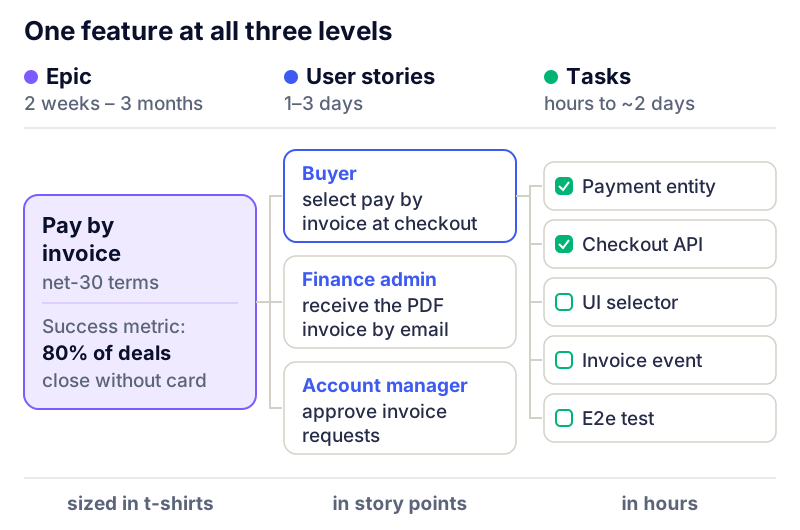
Abstractions mislead; here is a full breakdown. A B2B SaaS decides to let customers pay by invoice, not just by card.
The epic
Epic: Pay by invoice — enterprise customers can choose invoice payment with net-30 terms, so that procurement-driven accounts stop churning at checkout. Success metric: 80% of enterprise deals close without a card.
The stories inside it
As a buyer with an approved account, I want to select "pay by invoice" at checkout, so that I can order without a company card.
As a finance admin, I want to receive the PDF invoice by email at order time, so that I can process it in our AP tool.
As an account manager, I want to approve or reject invoice-payment requests, so that we control credit risk.
As a buyer, I want to see my outstanding invoices and due dates in the billing page, so that I can pay on time.
As a finance admin, I want overdue invoices to trigger a reminder at J+7 and J+21, so that collection does not depend on manual chasing.
The tasks under one story
Story: "select pay by invoice at checkout" breaks into:
Add payment-method entity and "invoice" option behind a feature flag.
Extend checkout API to accept invoice payment for approved accounts.
UI: payment selector with eligibility state and helper text.
Emit "order placed – invoice" event for the billing service.
E2e test: approved account completes checkout without card.
Read the three levels again: the epic speaks revenue, the stories speak user capability, the tasks speak code. Nobody has to translate.
When to split (and when not to)
Split an epic into stories when it becomes "Next" — an epic two quarters away needs a title and a success metric, nothing more. Breaking it down early is inventory that will be rewritten anyway.
Split a story when the team cannot estimate it, or when the estimate exceeds ~half a sprint. Use vertical slicing patterns (workflow steps, business rules, happy path first) — never backend/frontend splits.
Split a story into tasks at sprint planning, by the people who will build it. Task breakdown done weeks in advance is guesswork.
Do not split what is already small. A 2-day story with clear acceptance criteria does not need five sub-tasks to look organized. Ceremony is not rigor.
Estimation follows the hierarchy too: epics get t-shirt sizes or rough ranges, stories get story points, tasks get either hours or nothing at all.
Anti-patterns to avoid
The catch-all epic — "Improvements", "Tech debt", "Q3 bucket". An epic with no outcome and no end date is a junk drawer: it never finishes, so it never gets celebrated, audited or killed. Every epic needs a success metric and a plausible end.
Technical stories — "As a developer, I want to refactor the session module". If no user or business outcome is observable, it is a task under a story or epic that has one, or an engineering-budget item — not a story.
The eternal epic — open for 14 months, 60% done forever. Close it, ship what exists, re-open a smaller one if needed.
Stories that are secretly epics — "As an admin, I want a permissions system" will not fit in a sprint. If you write "system", "module" or "platform" in a story, you are naming an epic.
Task-level tracking in the roadmap — stakeholders shown 300 tasks see noise. Roadmaps show epics; sprints show stories and tasks.
Flat backlog denial — refusing hierarchy entirely. Fine at 30 tickets, unmanageable at 300. Structure is what lets you write good user stories without losing the big picture.
Which level for which conversation
Board / exec review → epics only, with outcomes and status.
Roadmap review with stakeholders → epics, plus the 2–3 flagship stories that make them concrete.
Backlog refinement → stories: splitting, acceptance criteria, estimates.
Sprint planning and daily → stories and tasks.
When a meeting feels unproductive, check the altitude: half of "bad backlog meetings" are epic conversations forced onto tasks, or vice versa.
Epics, stories and tasks in RoadmapHero
RoadmapHero implements this hierarchy natively: epics group stories, tickets carry story points, acceptance checklists, custom fields, and estimated vs actual costs. Dependencies make cross-story links explicit, and ticket health flags eternal epics and stale stories before they rot. The same data feeds two views: a shareable roadmap at epic level for stakeholders, and a backlog at story level for the team — prioritized with HeroScore. If delivery happens in Jira, Linear or GitHub, two-way integrations keep the levels in sync, and the White Rabbit agent replans late tickets automatically. Free trial, no commitment.
Frequently asked questions
What is the difference between an epic and a user story?
An epic is a large body of work — an outcome or capability that spans several sprints and gets broken down progressively. A user story is a small, sprint-sized slice of that work delivering observable user value. Epics are for roadmap conversations; stories are for sprint conversations.
How big should an epic be?
A useful heuristic: an epic covers 2 weeks to 3 months of work and breaks into roughly 5 to 20 stories. Below that, it is probably just a big story; beyond a quarter, it drifts into initiative or theme territory and deserves splitting.
Do tasks need the user story format?
No. Tasks are the how, not the what: "add index on invoices table" or "update the API client" are fine as written. Forcing "As a developer, I want…" onto tasks adds ceremony without information.
Should bugs be stories, tasks or their own type?
Treat bugs as their own item type. A bug that breaks an existing behavior is not new user value, so the story format fits poorly. Track them separately, prioritize them against stories, and attach them to the relevant epic when they cluster.
Who breaks epics into stories, and stories into tasks?
The PM or product owner leads epic-to-story breakdown, ideally with the team during refinement. Story-to-task breakdown belongs to developers — usually at sprint planning — because tasks are implementation decisions.