AI for product managers: practical use cases, limits and guardrails
AI for product managers: 6 practical use cases across the product loop, what AI should never decide, the real risks, and a 30-day plan to get started safely.
By the RoadmapHero team · Updated on · 8 min read
Key takeaways
- AI helps product managers most with high-volume work: synthesizing customer feedback, drafting specs and release notes, and answering questions about product data.
- AI should not make trade-off decisions or set product vision: it prepares the decision, and an accountable human makes it and explains it.
- The main risks are hallucinations, leaks of confidential data and sampling bias; the fix is systematic human review backed by traceable sources.
- Start with one use case, measure time saved and output quality for 30 days, and expand only what has proven itself.
AI in product management is best at absorbing volume: reading hundreds of customer comments, producing first drafts of specs, user stories and release notes, and answering questions about your product data. It does not replace a product manager's judgment or accountability — trade-offs, vision and saying no stay human. Used well, it gives you back time for the parts of the job that matter most: talking to customers and making decisions.
Chat assistants and agents are now part of the daily toolkit for many product teams. The risk today isn't missing the wave; it's sprinkling AI everywhere without knowing where it actually earns its keep. This guide walks through the product loop step by step, draws clear lines on what AI should not do, and ends with a 30-day plan to get started without spreading yourself thin.
What does AI actually change for product managers?
AI in product management means using large language models (LLMs) and agents to assist product work: analyzing text, drafting documents, retrieving information and automating repetitive steps. One distinction is worth keeping in mind. An assistant answers a single request. An agent chains several actions — read a ticket, look at the codebase, open a pull request — toward a goal you define.
The PM job boils down to three verbs: understand (customers, market, data), decide (what to do, what not to do, in what order) and move things forward (specs, alignment, communication). AI is strong at the first and third because both involve a lot of text to read or write. It is weak at the second, because a product decision depends on context the model can't see and accountability it can't carry.
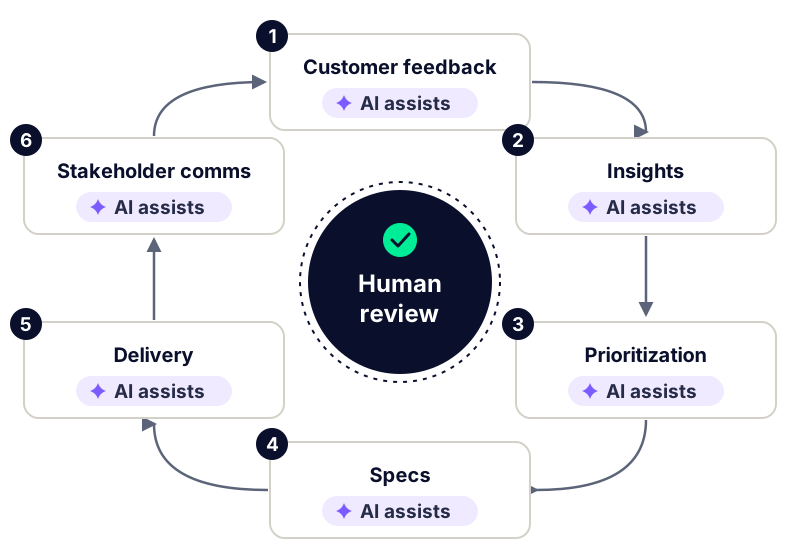
6 practical AI use cases across the product loop
1. Synthesize customer feedback and surface insights
This is where the payoff is clearest. Support tickets, NPS comments, interview notes, notes from sales calls: nobody reads 800 pieces of feedback a month with the same care for the first as for the last. A language model can tag each message by theme, extract the underlying problem, link it to a customer segment and cluster duplicates that are phrased differently.
Watch out for smoothing. AI favors what shows up often and can bury a weak but important signal. A useful rule of thumb: read about twenty raw messages per theme before drawing conclusions. To set up the intake side properly, see our guide to customer feedback management. In RoadmapHero, every customer message you import (by CSV or through MCP) is analyzed to detect and classify insights automatically, which you can then link to backlog items.
2. Prepare prioritization — don't delegate it
AI can do the groundwork: count how many customers hit a problem, spot requests that describe the same need in different words, pre-fill scoring fields, or play devil's advocate ("what are the three strongest arguments against this initiative?"). It should not set the weights of your criteria or the final order — those are strategic choices. To go beyond counting votes, read how to prioritize customer feedback.
3. Draft specs and user stories
An LLM can produce a first draft of a spec or user story in seconds from a problem statement, the related insights and adjacent tickets. It's also good at listing edge cases and suggesting acceptance criteria you might have missed. The traps are generic stories and invented constraints that sound plausible. Review every draft with the team, exactly as you would any other user story.
4. Connect specs to the codebase with agents
Coding agents such as Claude Code can read a codebase. For a PM that changes two things. You can ask "what already exists around this feature?" before writing the spec, and an agent can prepare a branch, an implementation and a pull request from a well-scoped ticket. Code review and architecture choices remain with engineers. RoadmapHero offers a writing agent that takes context and related tickets into account, and an agent connected to the codebase through Claude Code (branch, implementation, PR); every output is reviewed by a human before it is committed.
5. Release notes and stakeholder updates
Turning a list of shipped tickets into readable release notes, then adapting one version for sales, one for support and one for leadership, is exactly the kind of rewriting where AI saves time. Watch for overpromising ("fully solves the problem") and for dates slipping into the text without anyone approving them. The fundamentals are the same as in any stakeholder communication, and the same synthesis work will help when you present your roadmap to executives.
6. Query your product data through MCP
MCP (Model Context Protocol) is an open protocol that lets an AI assistant connect to a tool or data source in a standard way so it can read information from it. In practice, you ask questions in plain language from your assistant: "Which insights come up most among enterprise customers this quarter?" or "Which tickets contribute to the activation key result, and where do they stand?" RoadmapHero's MCP server, still experimental, exposes insights, customer messages, products, objectives, tickets and prioritization data to Claude Desktop, Cursor or custom agents. Start read-only and check who can access what. The protocol specification is public at modelcontextprotocol.io.
Task by task: what AI brings and what to watch
Task | What AI brings | Watch out for |
|---|---|---|
Feedback synthesis | Theme tagging, deduplication, problem extraction | Weak signals smoothed out: read raw messages |
Prioritization prep | Counting, clustering, counter-arguments | Weights and final order set by the team |
Specs and user stories | First draft, edge cases, acceptance criteria | Invented constraints, generic stories |
Code connection | Exploring what exists, agent-built branch and PR | Mandatory code review by engineers |
Release notes | Versions per audience, adjusted tone | Overpromising, unapproved dates |
Data questions (MCP) | Plain-language answers on product objects | Access rights, cross-check with the source |
What AI should not decide
Some responsibilities can't be delegated, even to an excellent model:
Trade-offs. Choosing between two initiatives involves real team capacity, risk appetite, commercial commitments and sometimes politics nobody has written down. A human has to be able to explain the call and own it.
Vision and strategy. A language model produces a plausible answer, often close to the average of what it has read. A product vision is the opposite: a deliberate, distinctive bet.
Saying no. Turning down a request from a key account or an executive depends on a relationship and context. AI can help you word the message; it shouldn't decide whether to send it.
Reading a single signal. One piece of feedback from a strategic customer can outweigh a hundred votes. That's judgment, not arithmetic.
A good working rule: AI prepares the file, the product manager signs the decision, and the decision is recorded with its reasons.
Risks and guardrails
Hallucinations
An LLM can state something false with total confidence: a number, a feature that doesn't exist, a customer quote paraphrased until it means something else. The risk grows when the model lacks context and has to fill in the gaps.
Data privacy
Customer messages, contract details, an unannounced roadmap: anything you paste into an AI tool leaves your perimeter. Check where data is processed, how long it's retained and whether it's used to train models.
Bias
AI amplifies the bias of the sample you feed it. If your feedback comes mostly from the most vocal customers, the synthesis will overrepresent them. It can also echo your own assumptions back if the question is leading.
Before connecting customer data to any AI tool, get the use case approved by your privacy or security team, and start with anonymized data or a narrow scope.
Guardrails that work
Systematic human review: no AI output reaches a customer, an executive or the backlog without being read by a person.
Provided context: give the model your sources (tickets, insights, objectives) instead of letting it guess; it's the best protection against hallucinations.
Traceability: every synthesis should link back to the original messages or tickets so any claim can be checked in one click.
Explicit data scope: who can query what, read-only or read-write.
Measurement: track the share of outputs you had to correct; it's your best trust indicator.
How to get started with AI in 30 days
You don't need a big transformation program. One month is enough to find out whether a use case delivers:
Week 1 — pick one use case. Choose a frequent, tedious task, such as the monthly feedback synthesis. Write down how long it takes you today.
Week 2 — build the context. Gather a glossary, your personas, this quarter's objectives and two or three examples of deliverables you consider good.
Week 3 — use it for real. Have AI produce the deliverable, review everything, and log each correction: factual error, tone, omission.
Week 4 — review the results. Compare time spent and quality. Rule of thumb: if more than a third of outputs need a full rewrite, either the context or the use case isn't ready yet.
If the results hold up, document the playbook (prompt, sources, reviewer) and move to the next step of the loop. If you want to try these workflows on your own insights, tickets and objectives, you can create an account and start with feedback synthesis.
Frequently asked questions
Will AI replace product managers?
Not in its current form. AI automates part of the reading and writing workload, which cuts time spent on repetitive tasks. Trade-offs, vision, relationships with customers and executives, and accountability for decisions remain human. The role shifts toward more judgment, discovery and alignment work, with less time spent producing documents from scratch.
What AI tools should product managers use?
Three categories cover most needs. A general-purpose chat assistant for drafting and rewriting. The AI features built into your product management tool, which work directly on your tickets and insights with their context. And agents connected to your data or codebase, through MCP or integrations, for multi-step tasks. Start with one tool and one use case.
Is it safe to paste customer data into ChatGPT or Claude?
Only if your vendor's terms and your internal policy allow it. Check data retention, whether inputs are used for training and where data is processed, then get approval from your privacy or security team. When in doubt, anonymize messages before sharing them and prefer business plans that cover these points contractually.
What is MCP and why does it matter for product managers?
MCP, the Model Context Protocol, is an open standard that lets an AI assistant connect to a tool or database in a consistent way. For product managers, it means asking plain-language questions about insights, objectives or the backlog from your assistant, without exporting data by hand. Start with read-only access and review permissions.
How do I get AI to write a good user story?
Give context before asking for output: the persona, the observed problem with two or three verbatim quotes, the goal and known constraints. Then ask for the story in your usual format, acceptance criteria and a list of edge cases. Review it with the team, strip anything generic, and check that the model hasn't invented constraints.