Gantt chart vs roadmap: which one do you need, and when?
Gantt chart vs roadmap: learn the real differences, see a side-by-side comparison table, and find out when to use each one and how to combine the two.
By the RoadmapHero team · Updated on · 8 min read
Key takeaways
- A roadmap explains why and what: the direction and outcomes a team is pursuing. A Gantt chart explains how and when: tasks, dates and the dependencies between them.
- A roadmap covers 3 to 18 months with precision that fades over time; a Gantt chart covers one bounded project, from a few weeks to a few months, down to the day.
- Use a Gantt chart when a project has a fixed deadline and hard dependencies; use a roadmap whenever you need to make trade-offs and align stakeholders.
- The two work best in a cascade: the roadmap sets priorities, a release plan slices them, and a Gantt chart is built only for work with critical dependencies.
A Gantt chart and a roadmap answer different questions. A roadmap is a direction-setting document: it shows why the team is working on something and what outcomes it expects over the coming months. A Gantt chart is an execution tool: it shows who does which task, when, and in what order the dependencies force. The choice comes down to one thing: are you trying to align people on a direction, or coordinate the delivery of a specific project?
The two get confused because they look alike: horizontal bars on a timeline. Plenty of "roadmaps" shown to leadership are really Gantt charts in disguise, with day-level dates nine months out. That usually backfires. This guide lays out the differences, when each format fits, and how to make them work together instead of competing.
What is a Gantt chart?
A Gantt chart is a project schedule where each task is a bar on a timeline, with a start date, a duration and an end date. Henry Gantt popularized the format in the 1910s to manage industrial production, and it is still the backbone of traditional project management.
A complete Gantt chart usually includes:
a task list derived from a work breakdown structure (WBS)
estimated durations with start and end dates
dependencies between tasks, most often finish-to-start (B can't begin until A is done)
milestones, which are key dates with no duration (handoff, acceptance testing, go-live)
a critical path, the chain of tasks where any delay pushes back the project end date
optionally, the people or resources assigned to each task
Its strength is fine-grained coordination. When a data center move involves a vendor, a network team, an application team and a reserved maintenance window, a Gantt chart shows at a glance what blocks what. Its weakness is the flip side: it assumes scope and estimates are known. When uncertainty is high, every bar becomes a fragile promise.
What is a roadmap?
A roadmap is a strategic plan that shows how a product or team intends to move toward its goals over time. It groups work into themes, initiatives or problems to solve, ties them to objectives, and deliberately gets less precise the further out it looks. The Now-Next-Later roadmap is the purest form of this idea: what we're doing now, what comes next, what we're considering later.
A roadmap doesn't list tasks, and it doesn't tell anyone what to code on Tuesday. Its job is to align leadership, sales, support and engineering on choices, and to make trade-offs explicit. The strongest roadmaps are outcome-based: "cut onboarding time in half" rather than "redesign the welcome screen."
Project roadmaps sit somewhere in between. They carry more dates than a product roadmap but stay at the level of phases and milestones, not tasks. If that's what you need, see how to build a project roadmap step by step.
Gantt chart vs roadmap: side-by-side comparison
Here are the differences that matter when you pick a format.
Criterion | Gantt chart | Roadmap |
|---|---|---|
Purpose | Coordinate project execution | Set direction and make trade-offs |
Time horizon | One bounded project (weeks to months) | 3–18 months, fading precision |
Level of detail | Tasks, exact dates, dependencies | Themes, initiatives, objectives |
Audience | Project manager, delivery teams | Executives, stakeholders, teams |
Update cadence | Continuous, whenever something slips | Monthly or quarterly review |
Typical tool | MS Project, spreadsheet, PM software | Product roadmap tool |
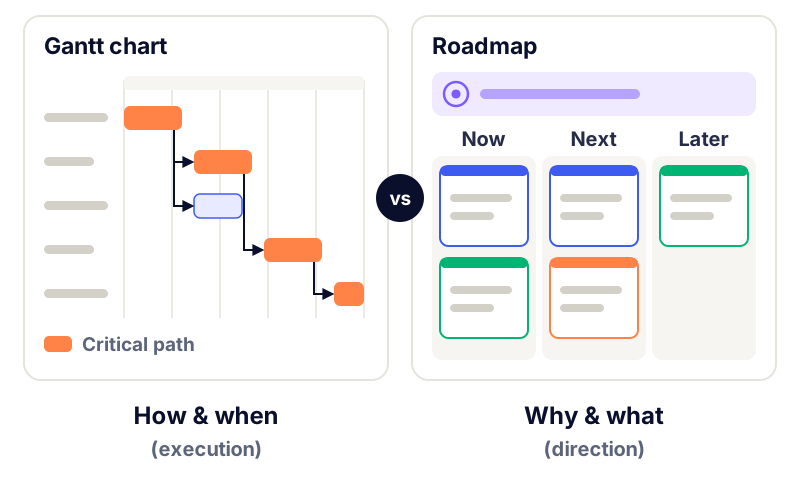
One rule of thumb covers most situations: the higher up the organization a document is read, the fewer precise dates it should carry. An executive team needs to understand the bets and the reasoning behind them. An integration team needs to know the exact day the test environment will be ready.
When should you use a Gantt chart?
A Gantt chart is the right tool when three conditions hold: scope is stable, the deadline is set from outside the team, and there are many dependencies, especially across different groups. Typical cases:
an infrastructure migration with a booked cutover window
a regulatory compliance project with a legal deadline
a coordinated launch across product, marketing, legal and support
an integration with a partner that ships its own components on fixed dates
a customer rollout, such as onboarding a large account, with sequential steps
In these situations, skipping the Gantt chart is a mistake. Without a visible critical path, nobody notices that a vendor's three-day delay pushes go-live back by two weeks.
When should you use a roadmap?
A roadmap is the right tool whenever the main challenge is deciding what to do, not sequencing work that's already decided. That includes:
managing a product continuously, with no end date
presenting strategy to leadership or the board
aligning sales and support on what's coming (and what isn't)
connecting work to company objectives and OKRs
sharing direction with customers through a public roadmap
If your team works in sprints and learns about the problem as it goes, an agile roadmap is more honest than a Gantt chart. It commits to outcomes and time horizons, not to task dates nobody can estimate yet.
How do you use a Gantt chart and a roadmap together?
"Gantt or roadmap" is a false choice. In most product organizations, the two coexist at different levels, in a cascade. Here's a flow that works:
The roadmap sets direction. It places initiatives in Now, Next or Later, each linked to an objective. No fine-grained dates unless there's a genuine external constraint.
The backlog turns initiatives into work. Each initiative breaks down into epics and user stories, and the link between roadmap and backlog stays traceable.
A release plan slices the Now column. For initiatives in progress, you group work into versions with target dates, sized against the team's real capacity.
A Gantt chart appears only for work with hard dependencies. If a release depends on a vendor, a migration or a dated marketing launch, build a Gantt chart for that piece of work and nothing else.
Status flows up, detail doesn't. When the Gantt chart shows the critical path slipping, update the roadmap at the initiative level ("moves from Now to Next"), not at the task level.
Here's an example. A SaaS team has "Launch in Germany" in the Now column of its roadmap, tied to a growth objective. The release plan has three versions: UI localization, euro invoicing with German VAT, and local compliance. The third involves legal, a hosting provider and a regulatory effective date. That's the only piece that earns a Gantt chart with a critical path. Leadership keeps reading the roadmap.
Before you draw a Gantt chart, ask one question: if a task slips by a week, is someone else blocked? If the answer is no for most tasks, a release plan is enough.
Common mistakes to avoid
The same mistakes show up again and again when teams mix the two formats.
Showing a Gantt chart to executives as "the roadmap." Leaders remember dates, not assumptions, and every slip then turns into a credibility problem.
Putting day-level dates on work nine months out. Beyond the current quarter, a precise date is a guess dressed up as a commitment.
Building a Gantt chart for the entire backlog. A 300-row Gantt chart is neither read nor maintained, and it's wrong by week two.
Using the roadmap as a task list. A roadmap that drills down to tickets loses its role in trade-offs and becomes unreadable for leadership.
Letting the two drift apart. A Gantt chart that slips while the roadmap stays unchanged gives two audiences two versions of the truth.
Ignoring capacity. A perfectly sequenced Gantt chart planned at 100% of theoretical capacity will slip, guaranteed.
If you need to report progress to leadership, build a dedicated view instead of exporting your Gantt chart. This guide on how to present a roadmap to executives offers a five-slide structure.
Which tool for which format?
For Gantt charts, classic project management tools do the job well: MS Project, timeline views in ticketing tools, or even a spreadsheet for a small project. Roadmaps need something different. You have to connect initiatives to objectives, the backlog and prioritization, then produce views tailored to each audience. For a starting point, these roadmap templates and examples compare timeline, Now-Next-Later, theme-based and outcome-based formats.
In RoadmapHero, you build the roadmap by dragging and dropping items from the backlog, with a configurable time scale (from weeks to years) and an automated Now-Next-Later view. Release planning happens in the same place, and the Jira and GitHub integrations keep the link to execution without turning the roadmap into a Gantt chart. You can try RoadmapHero for free to test this setup on your own backlog.
Frequently asked questions
What is the difference between a Gantt chart and a roadmap?
A roadmap shows direction: why the team is working on something and what outcomes it expects over several months, with precision that fades over time. A Gantt chart shows project execution: tasks, dates, dependencies and the critical path. A roadmap is for making trade-offs and aligning people; a Gantt chart is for coordinating people and deliverables within a scope that's already decided.
Can you use a Gantt chart as a product roadmap?
You can, but it rarely helps. A Gantt chart forces exact dates and durations on every item, which turns assumptions into commitments. For a product, a roadmap organized by time horizons (Now, Next, Later) or by themes reflects uncertainty far better. Keep Gantt charts for one-off projects with a fixed deadline and strong dependencies.
Are Gantt charts compatible with agile?
Partly. A year-long Gantt chart for an entire product contradicts the agile idea of continuous adaptation. But a Gantt chart limited to one piece of work with hard dependencies, such as a migration or a coordinated launch, sits comfortably alongside sprints. The team still delivers in increments, and the Gantt chart only synchronizes external milestones.
What is a release plan compared to a roadmap?
A release plan breaks the roadmap's in-progress initiatives into shippable versions with target dates and estimated scope. It sits between the roadmap, which sets priorities over several months, and the backlog or Gantt chart, which detail execution. It usually covers the next one to three months and gets updated every sprint.
Should I show executives a roadmap or a Gantt chart?
A roadmap. Executives need to understand objectives, current bets, the reasoning behind them, risks and the decisions expected from them. Task-level dates pull the conversation toward operational tracking. If a critical project has a hard deadline, show its milestone and risk level, not the details of its critical path.