Project risk management: risk matrix, risk register and responses
Project risk management made practical: identify risks, score them on a risk matrix, choose a response and keep a risk register that drives action.
By the RoadmapHero team · Updated on · 10 min read
Key takeaways
- Project risk management is a four-step loop: identify what could derail the project, assess each risk by probability × impact, choose a response, and monitor it until it closes.
- A 5×5 risk matrix scores probability and impact from 1 to 5; the product, from 1 to 25, sorts risks into green, amber and red zones so you know where to act first.
- There are four responses to a threat: avoid, reduce, transfer or accept. Each one needs a named owner, a known cost and a review date.
- A useful risk register is short, reviewed every one to two weeks and tied to the schedule. A risk that triggers no action is just a worry written down.
Project risk management is the practice of spotting, before they happen, the events that could push a project off its targets for schedule, budget, scope or quality; scoring them by probability and impact; deciding how to respond; and tracking them until they go away. Two tools do most of the work: the risk matrix, which ranks risks, and the risk register, which records who does what about them. The document matters less than the habit: risks need to be reviewed in your regular project cadence, not once at kickoff.
The classic failure mode is familiar. The team runs a risk workshop during initiation, pastes the output into the project charter, and never looks at it again. Six months later, the risk flagged in January shows up as a crisis at the steering committee. This guide gives you a four-step method, a filled-in risk register example, the weak signals worth watching, and the mistakes that quietly make the whole exercise pointless.
What is a project risk?
A project risk is an uncertain event that, if it occurs, affects at least one project objective. Both words matter. Something that has already happened is not a risk, it is an issue, and it calls for an action plan, not prevention. And an event that touches no objective does not deserve a line in your register.
Vague risks are useless risks. "Tight timeline" or "resourcing" gives nobody anything to act on. Write every risk in three parts: cause → event → consequence.
Weak: "Vendor risk."
Strong: "The billing API vendor has a single developer on our integration (cause); if they deliver more than two weeks late (event), go-live slips by the same amount and end-user training has to be rescheduled (consequence)."
The longer sentence pays for itself: it tells you who can act, on what, and what doing nothing would cost. Risks can also be positive. An opportunity, such as a reusable component that could save three weeks, deserves tracking too; the matching responses are exploit, enhance, share or accept.
Many teams track risks alongside assumptions, issues and dependencies in a single RAID log. That works, as long as risks keep their own scoring and owners.
Step 1: identify project risks
Risk identification is a team sport. A project manager alone mostly sees schedule risks. The architect sees technical risks, procurement sees vendor risks, and the business side sees adoption risks. Get them in a room for an hour during initiation, and repeat the exercise at every phase change.
Three techniques that consistently work:
Pre-mortem. Ask: "It's six months from now and the project has failed. What happened?" Everyone writes causes silently for five minutes, then you cluster them. Framing the failure as a given makes people far more candid than asking "what could go wrong?"
Assumption review. Walk through the plan and the budget and list everything they take for granted: "UAT will take three weeks," "the infrastructure team is free in March." Every unverified assumption is a candidate risk.
Category checklist. Sweep the usual suspects so nothing obvious slips through.
Categories to cover:
Technical: integrations, performance, data migration, legacy code.
Dependencies and vendors: external deliveries, other projects, contracts.
People and capacity: scarce experts, shared resources, attrition, vacations.
Scope and requirements: fuzzy needs, requests added along the way.
Organization and adoption: change management, business availability.
Regulatory and security: compliance, personal data, audits.
Lessons learned from past projects are the most underused source. Within one organization, the same risks tend to come back. For where risk work fits in the overall lifecycle, see our project management guide.
Step 2: assess risks with a risk matrix
A risk matrix, also called a probability and impact matrix or risk assessment matrix, plots each risk on two axes: how likely it is and how bad it would be. Multiplying the two scores gives a risk score that lets you compare very different risks. The most common format is a 5×5 grid.
The trap is scoring by gut feel. Write down a shared scale so that "impact 4" means the same thing to everyone. Here is an example to adapt to your project size:
Score | Probability | Schedule impact | Budget impact |
|---|---|---|---|
1 | Rare (under 10%) | Under 1 week | Under 1% |
2 | Unlikely (10–30%) | 1–2 weeks | 1–3% |
3 | Possible (30–50%) | 2–4 weeks | 3–5% |
4 | Likely (50–80%) | 1–2 months | 5–10% |
5 | Almost certain (over 80%) | Over 2 months or a missed customer milestone | Over 10% |
Always take the highest impact score across dimensions (schedule, budget, quality, reputation), then place each risk on the grid.
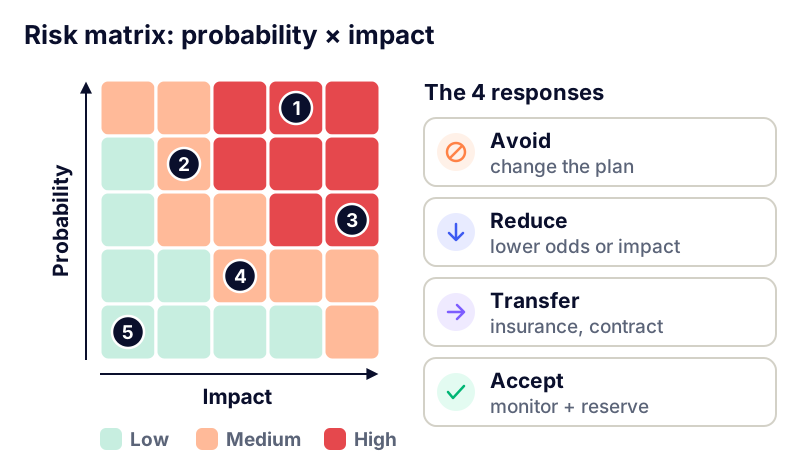
A common convention for reading the matrix:
Red (score 15–25): respond now, name an owner, escalate to the steering committee.
Amber (score 5–12): define a response plan, review at every team check-in.
Green (score 1–4): watch list only, no dedicated action.
For projects with big financial stakes, you can go quantitative. Expected monetary value (probability × cost of impact) helps size a contingency reserve. For most projects, though, a well-calibrated qualitative matrix is enough to decide where the effort goes.
Step 3: choose a risk response
Every amber or red risk needs a decision. There are only four risk response strategies for threats, and naming them explicitly beats the usual "we'll keep an eye on it."
Avoid: change the plan so the risk can no longer happen. Example: drop an unfamiliar technology for a proven one, or cut a feature that depends on an unreliable third party.
Reduce (mitigate): lower the probability or the impact. Example: run a technical spike early, train a second expert, split a go-live into two releases.
Transfer: shift the financial impact to someone else. Example: late-delivery penalties in the vendor contract, insurance, fixed-price instead of time-and-materials. Note that you transfer the cost, rarely the problem: a penalized vendor does not give you your weeks back.
Accept: consciously decide to do nothing because the response would cost more than the risk. Acceptance can be active, with a time or budget reserve, or passive, dealing with it if it happens.
For red risks, add a contingency plan and a trigger: the observable event that moves you from plan A to plan B. "If the vendor hasn't delivered the test environment by October 15, we switch to mock data and notify the business teams." A trigger turns a vague worry into a dated decision.
Put a price on every response before choosing it. A mitigation plan that ties up two people for a month to avoid a likely one-week slip is a bad trade. Accepting a risk is a legitimate decision, as long as it is explicit and your sponsor knows about it.
Avoid and reduce responses usually change the schedule: a spike, an extra release, a buffer before the deadline. Build them into your project plan instead of leaving them in a separate document nobody opens.
Step 4: monitor risks with a risk register
A risk register is the single source of truth for every project risk: its assessment, its response and its status. A good risk register template has these fields:
ID and a cause → event → consequence description
Category, probability, impact and risk score
Response strategy and related actions
Owner: one person, not a team
Trigger and next review date
Status: open, in progress, closed, or occurred (now an issue)
Here is an excerpt from a risk register for a fictional ERP migration:
Risk | P × I | Response | Owner and due date |
|---|---|---|---|
Billing API vendor delivers late, pushing go-live | 4 × 4 = 16 | Reduce: contractual interim milestones and a weekly vendor sync | Project manager, Sep 30 |
Incomplete customer data at migration blocks UAT | 3 × 4 = 12 | Reduce: dry-run migration in month 2 | Data lead, Oct 15 |
Key users unavailable during month-end close | 4 × 3 = 12 | Avoid: move UAT outside the close period | Business sponsor, Oct 1 |
License overage if user count exceeds the contract | 2 × 3 = 6 | Transfer: negotiated tier clause | Procurement, Oct 20 |
Payroll expert leaves mid-project | 2 × 4 = 8 | Reduce: pair a backup and document configurations | IT HR manager, Oct 31 |
A few operating rules:
Review the register every one to two weeks with the team, in about 15 minutes: new risks, changed scores, overdue actions, risks to close.
Bring the top five to the steering committee, not the full list, along with the decisions you need. Our project steering committee guide includes an agenda with a dedicated risks slot.
Show risks on the status report next to schedule and budget. A project status dashboard without a risk line tells half the story.
Close risks that can no longer happen. A register that only grows stops being read.
How to spot weak signals before they become issues
The most dangerous risks are rarely the ones in the register. They are the ones that creep in quietly. A weak signal is an isolated clue that is easy to explain away, and it often means a risk is already materializing.
The usual ones:
a task that slips a week, then another week, "with no impact on the milestone"
an interim milestone missed and labeled "not blocking"
a vendor or partner team that takes longer and longer to answer
a status that stays green while actual progress has been flat for three check-ins (the watermelon effect: green outside, red inside)
business workshops that get canceled, or different attendees every time
None of these justifies an alarm on its own. The pattern does. That is why tracking slippage over time beats taking a status snapshot every Friday. In RoadmapHero, for instance, each plan item's health is semi-automatic (late, moved, new), and a delay entered once shifts the dependent tasks, so the impact on the milestone shows up right away instead of at the next committee meeting.
Finally, make bad news safe to share. If the person who raises a risk gets called negative, nobody will raise the next one. How you communicate with stakeholders directly shapes the quality of the warnings you get.
Common project risk management mistakes
An 80-line register. Nobody reads it. Keep critical risks at the top and archive the rest.
Risks written as topics. "Schedule," "budget" and "HR" are not actionable. Go back to cause → event → consequence.
No owner, or a collective owner. "The team" never follows up. One name per risk.
Frozen scores. A score set at kickoff and never revisited is meaningless six months later.
Hiding risks from the sponsor. A sponsor told early can make trade-offs; a surprised sponsor loses trust.
Ignoring cross-project risks. When several projects share the same experts or vendor, the risk belongs at the project portfolio level, not project by project.
Set it up in a week
Agree on a one-page probability and impact scale.
Run a one-hour pre-mortem with the team and key contributors.
Write each risk as cause → event → consequence, score it and plot it on the matrix.
Pick a response and an owner for every amber or red risk, with a trigger for the red ones.
Add the register review to your recurring team check-in and the top five to the steering committee agenda.
If you want delays and dependencies to surface in a shared plan rather than in status reports, you can try RoadmapHero on your next project.
Frequently asked questions
What is the difference between a risk and an issue in project management?
A risk is an uncertain event that might happen and would affect a project objective, so you manage it through prevention by lowering its probability or impact. An issue is something that has already happened, so you handle it with an immediate action plan and, if needed, escalation to the sponsor. When a risk materializes, it leaves the risk register and becomes an issue tracked as such.
How do you create a risk matrix?
Start by defining a 1-to-5 scale for probability and for impact, with written thresholds such as percentages, weeks of delay or share of budget. Score each risk on both axes, multiply the scores to get the risk score, and place it on a 5×5 grid colored green, amber and red. Risks in the red zone get a response and a named owner first.
What should a risk register include?
A risk register should include, for each risk, an ID, a precise cause-event-consequence description, the category, probability, impact and risk score, the chosen response with its actions, a named owner, a trigger, a next review date and a status. A spreadsheet is fine to start with, as long as it is reviewed regularly and linked to the project schedule.
What are the 4 risk response strategies?
The four risk response strategies for threats are avoid, reduce, transfer and accept. Avoiding means changing the plan so the risk disappears. Reducing, or mitigating, lowers its probability or impact. Transferring shifts the financial consequence to a third party through a contract or insurance. Accepting is a conscious decision not to act, optionally backed by a time or budget reserve.
How often should project risks be reviewed?
A good rule of thumb is to review the risk register every one to two weeks with the team, in about fifteen minutes, and to present the five most critical risks at every steering committee meeting. Also run a full identification again at each phase change, for example between design and build, because the risk profile shifts as the project moves forward.