How to create a project plan (with a backward planning example)
How to create a project plan step by step: WBS, estimates, dependencies, critical path and buffers, plus a backward planning example and common mistakes.
By the RoadmapHero team · Updated on · 9 min read
Key takeaways
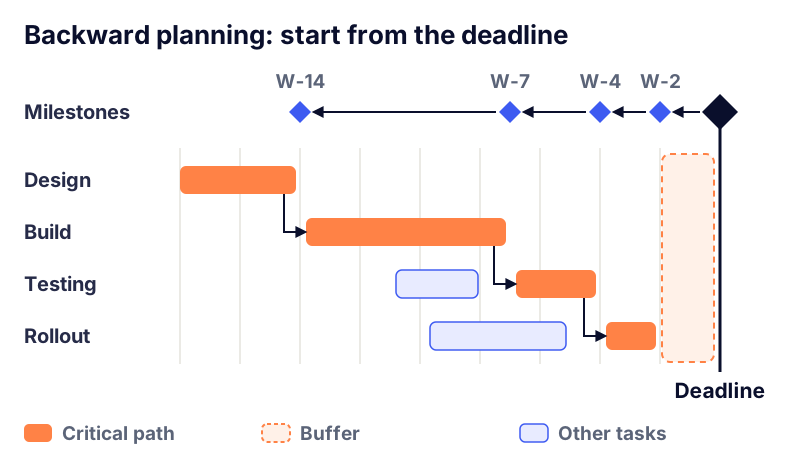
- Backward planning starts from a fixed deadline and places milestones and tasks in reverse order, which tells you the latest date the project can start.
- Creating a project plan takes 7 steps: goal and deadline, work breakdown structure, estimates, dependencies, critical path, buffers, then resources and sign-off.
- The critical path is the chain of tasks with zero float: one day of delay on any of them pushes the project's end date by one day.
- A common rule of thumb is a project buffer of 10 to 20% of the critical path duration, placed before the deadline instead of padded into every task.
A project plan lays out everything needed to reach the project's goal: the scope, the tasks, their durations and dependencies, who owns them, the key milestones and the resulting schedule. To create one, you break down the work, estimate it, sequence it, find the critical path and add a buffer. When the end date is fixed, you do it through backward planning: you start from the deadline and work back to find out when each task must start at the latest.
This guide walks through the method step by step, then applies it to a complete, numbered example. It is written for project managers, PMO teams and anyone who has to commit to a date. If you are new to the field, start with our project management guide, which places planning within the five phases of a project.
Project plan vs project schedule vs Gantt chart
People use these terms interchangeably, but they mean different things:
The project plan is the full playbook: scope, schedule, budget, resources, risks and how the project will be governed.
The project schedule is the time dimension of that plan: tasks, durations, dependencies and dates.
A Gantt chart is one way to display the schedule: bars on a timeline, linked by dependency arrows.
So a backward plan can live in a Gantt chart, a table or a simple timeline. And a Gantt chart is not a roadmap: a roadmap explains the why and the what over several months, a Gantt chart the how and the when. Our comparison of a Gantt chart vs a roadmap helps you pick the right format for each audience.
When should you use backward planning?
Backward planning is the right approach whenever the end date is not up for negotiation: a trade show, a regulatory deadline, a lease that ends, a fiscal year-end, a launch that has already been announced. In those cases the real question isn't "when will we be done?" but "when do we have to start, and what won't make it?"
Forward planning, from today toward the earliest possible finish, still makes sense when the date simply follows from the work, as with an internal project with no outside constraint. In practice, experienced project managers do both: a backward pass to check feasibility, then a forward pass to measure how much float they really have.
How to create a project plan in 7 steps
1. Pin down the goal, scope and deadline
Every plan starts from the project charter: what will be delivered, what won't, and the date that has to hold. Write down the calendar constraints too: holidays, change freezes, vendor availability, go-live windows. A schedule built on fuzzy scope is wrong by the end of week one.
2. Break down the work with a WBS
A work breakdown structure (WBS) decomposes the project into deliverables, then into work packages, down to a level where each package can be estimated and assigned to one owner. Two rules help:
The 100% rule: the WBS covers all the project's work, and nothing outside it.
The right package size: as a rule of thumb, a work package is between one day and two weeks of effort. Bigger and you can't track it; smaller and the schedule becomes unmanageable.
Break down by deliverable ("data migrated," "users trained") rather than by vague activity ("data work").
3. Estimate durations
For each package, estimate the effort (in person-days) and then the duration (in calendar days, based on how many people work on it and how available they really are). Have the people doing the work do the estimating. For uncertain tasks, three-point estimating (the PERT formula) helps: duration = (optimistic + 4 × most likely + pessimistic) / 6. A task estimated at 5 days at best, 8 days most likely and 17 days at worst comes out at (5 + 32 + 17) / 6 = 9 days.
Account for real availability: someone assigned to the project half time takes twice as long in calendar time. Our guide to capacity planning shows how to work out what actually fits in a period.
4. Sequence tasks and map dependencies
Figure out what must be finished before what can start. There are four dependency types:
Finish-to-start (by far the most common): testing starts when configuration is done
Start-to-start: documentation starts at the same time as development
Finish-to-finish: training finishes when testing finishes
Start-to-finish: rare; for example, the old system only shuts down once the new one starts
Flag external dependencies as well (a vendor, another project, a steering committee decision). They are the riskiest because you don't control them.
5. Find the critical path
The critical path is the longest chain of dependent tasks from start to finish. Every task on it has zero float: one day of delay on any of them pushes the end date by a day. Other tasks have float (or slack), meaning they can slip a little without affecting the deadline. The critical path is where your attention, your best people and your checkpoints should go. The technique, known as the critical path method, dates back to the late 1950s and still underpins every scheduling tool.
6. Add buffers, the right way
Padding every task "just to be safe" backfires: work tends to expand to fill the time available. Instead, estimate each task realistically and pool the contingency into a single project buffer placed right before the deadline, visible and tracked. As a rule of thumb, plan 10 to 20% of the critical path duration, more if the project has many unknowns. The risks in your project risk register are a good guide to sizing it.
7. Assign owners and get sign-off
Give every work package one owner, check that nobody is scheduled beyond their capacity, then have the team and the sponsor sign off. If the latest start date has already passed, backward planning has done its job: cut scope, add people to the critical path or renegotiate the deadline, now rather than in the final month.
Backward planning example: an office move
A 120-person company has to leave its current office when the lease ends on June 30, 2027. The first working day in the new office is set for Monday, June 28, 2027. Call that week W0 and work backward.
Task | Duration | Depends on | Latest window |
|---|---|---|---|
A. Scope, budget and vendor selection | 3 weeks | — | W-16 to W-14 |
B. Build-out and furniture install | 8 weeks | A | W-13 to W-6 |
C. IT hardware procurement | 5 weeks | A | W-10 to W-6 (3 weeks of float) |
D. Network setup and IT testing | 2 weeks | B and C | W-5 to W-4 |
E. Final walkthrough and fixes | 1 week | D | W-3 |
Project buffer | 2 weeks | E | W-2 to W-1 |
How to read this plan:
The critical path is A, B, D, E: 3 + 8 + 2 + 1 = 14 weeks. No delay on it can be absorbed except by the buffer.
IT procurement has 3 weeks of float: it can start as soon as scoping ends (W-13) but must start by W-10 at the latest.
The 2-week buffer is about 14% of the critical path, inside the 10 to 20% range.
The project must start by W-16, which is Monday, March 8, 2027.
The real calendar adjusts the math: Memorial Day (May 31) falls in the IT testing week. Either the start moves up a week, or you knowingly let that day come out of the buffer.
A fourth workstream, employee communication and packing, runs in parallel from W-6 onward and isn't critical. The furniture order deserves closer attention: it sits inside build-out, depends on a vendor's lead time and leaves little room if the order is placed late.
Always show your sponsor the latest start date, not just the end date. "If we don't start by March 8, June 28 is no longer achievable" triggers a decision. "We're targeting June 28" triggers nothing.
Common project planning mistakes
Planning at 100% capacity: meetings, support work and surprises eat a large share of everyone's week. A schedule with no slack slips by design.
Confusing effort with duration: 10 person-days is not 10 calendar days if the person is only available half time.
Forgetting external dependencies: legal review, vendor deliveries, committee approvals.
Hiding contingency inside each task: it gets used up without anyone noticing, and your real buffer is zero.
Scheduling distant work to the day: plan the next few weeks in detail and keep later work at milestone level (rolling wave planning).
Never updating the plan: a schedule refreshed only the night before the steering meeting no longer helps anyone steer.
Keep the plan alive
A project plan isn't a document you file away; it's a steering tool. Each week, compare actual against planned on the critical path, track how much buffer you've consumed, and surface the gaps in your project status dashboard. When the buffer is burning faster than the project is progressing, a decision is needed, and it belongs in the project steering committee.
Keeping a schedule current by hand gets expensive fast once dependencies pile up. In RoadmapHero, you build the schedule with drag and drop, dependencies and milestones, on any scale from week to year; when a delay is entered, dependent tasks are rescheduled automatically and project health updates on its own. You can try it for free on your next backward plan.
Frequently asked questions
What is backward planning in project management?
Backward planning, also called reverse scheduling, builds the schedule from a fixed end date instead of from today. You place the deadline first, then the milestones and tasks in reverse order, using their durations and dependencies. The result is the latest possible start date for every task, which tells you immediately whether the deadline is realistic and what has to change if it isn't.
What should a project plan include?
A complete project plan includes the goal and scope, the work breakdown structure, a schedule with durations, dependencies and milestones, the critical path, resource assignments, the budget, a risk register with a contingency buffer, and the governance: who decides, how often progress is reviewed and how stakeholders are kept informed. Small projects can fit all of this on a few pages.
How do you calculate the critical path?
List every task with its duration and dependencies. Run a forward pass to find each task's earliest start and finish, then a backward pass from the deadline to find its latest start and finish. The difference between latest and earliest is the float. Tasks with zero float form the critical path, which is the longest chain of dependent work in the project.
How much buffer should a project plan have?
A common rule of thumb is 10 to 20% of the critical path duration, higher for projects with many unknowns or heavy external dependencies. Keep the buffer as one visible block before the deadline rather than spreading it across tasks, and track how fast it is consumed compared with how fast the project progresses. That ratio is an early warning signal.
What is the difference between a project plan and a project schedule?
The project schedule is the time dimension of the plan: tasks, durations, dependencies and dates, often displayed as a Gantt chart. The project plan is broader. It also covers scope, budget, resources, risks, communication and governance. You can have a schedule without a real plan, but that usually means nobody has agreed on scope, budget or who makes the calls.